How fast is LlamaStash? Overhead, throughput, and a fair comparison with Ollama and LM Studio
A reproducible benchmark of LlamaStash against raw llama-server, Ollama, and LM Studio on AMD APU, Apple Silicon, and NVIDIA

In my release post for LlamaStash I made a claim I need to back up. The wrapper adds zero overhead vs running llama-server directly. That is the kind of claim that should not exist in a blog post without numbers behind it. So here are the numbers.
LlamaStash spawns the unmodified upstream llama-server. So three different questions follow from that, and there is a benchmark suite for each.
- Suite A: overhead regression. Does
llamastash start <model>add any measurable overhead on top of rawllama-serverwhen both run the same command line? This is the question the whole architecture depends on. - Suite B: cross-tool comparison. How does LlamaStash-as-shipped compare to Ollama and LM Studio on the same model, same hardware, through their OpenAI-compatible HTTP endpoints? This is the question users care about.
- Suite C: proxy overhead. Does going through the LlamaStash OpenAI-compat proxy cost anything vs hitting
llama-serverdirectly? This is the smallest question, but it has to be asked because the proxy is the default surface.
All three suites live in docs/benchmarks/ in the repo. The harness is in scripts/bench/. The methodology page covers fairness, how I throw out noisy runs, and why outputs differ across backends. Read it before pulling any single number out of context. On its own, one cell can mislead.
The short version, if you are skimming. Two terms first: decode is tokens per second while the model generates, and TTFT is time to first token, the delay before anything comes back. And there are two ways to read every comparison below: matched-flags (called normalized in the harness, every tool runs the same knobs) and out-of-the-box (called defaults, what you get when you just run the tool). They tell different stories.
- The wrapper adds no measurable overhead. With matched flags, LlamaStash runs the same speed as raw
llama-server: within 1% on Apple Silicon and on three of four sizes on the AMD APU. The one exception is the 35B-A3B MoE on AMD, at -1.8% decode. That same cell flips to +1.1% the other way out of the box, so it is run-to-run timing noise on a fork-and-spawn, not real overhead. NVIDIA decode is -0.57%, a hair past my 0.5% warning line. Everything stays well inside my 2% hard-fail line. - Out of the box, LlamaStash is a touch faster than raw
llama-server, because it sets good defaults for you: all GPU layers on every GPU backend, and flash-attention for Qwen and Llama models on Apple Metal and CUDA. On the Mac Qwen run that is +7.3% decode over raw llama-server’s stock defaults. On the AMD APU the upstream defaults are already good, so the two match. On NVIDIA the gap is wider than those flags explain, which I leave as an open question below. - Ollama is slower, sometimes a lot slower. It is 38-72% behind raw llama-server on decode on the AMD APU. On the Mac its RAG prefill is 52× slower than the direct path, because it re-reads the whole document on every request instead of caching it. On NVIDIA Vulkan, the RAG prefill runs never finished.
- LM Studio is a mixed bag. Its bundled ROCm runtime crashes on Strix Halo (
gfx1151) for every model except the small one, so I could only compare it on Vulkan. There it loses decode to LlamaStash on three of four sizes (+8% small, +52% mid, +32% large MoE) and wins large_dense by 7%. And everywhere, it pays a 170-2300 ms first-token tax from its OpenAI shim and just-in-time model loading. - The proxy is free. Talking to LlamaStash’s proxy instead of llama-server directly costs +0.45 ms to first token on AMD, -0.6 ms on the Mac, +0.57 ms on NVIDIA. Zero on decode. Sub-millisecond, which is nothing.
Now to the actual point of this post.
The setup
Same model bytes, same workloads, same hardware. Three platforms.
Platforms
| Platform | CPU / SoC | GPU | RAM / VRAM | OS | llama.cpp build | Date |
|---|---|---|---|---|---|---|
| AMD APU | Ryzen AI Max+ 395 (Strix Halo) | Radeon 8060S iGPU (RDNA 3.5, gfx1151) | 128 GiB unified, 70 W TDP | Arch Linux, ROCm 7.2.3 | b9245 (b39a7bf1b) | 2026-05-24 |
| Apple Silicon | Apple M1 | Integrated, Metal | 16 GiB unified | macOS 26 (Darwin 25.4.0) | b9330 (328874d05, Homebrew Metal) | 2026-05-27 |
| NVIDIA | Intel i9-11900H laptop | RTX 3050 Ti Laptop (Ampere, sm_86) | 4 GiB VRAM, 63 GiB host | Manjaro 6.6.141, driver 595.71.05, CUDA 13.2 | b9360 (6b4e4bd5, CUDA + Vulkan lanes) | 2026-05-28 |
This is just the hardware I had on hand, but the three machines sit in usefully different places. Strix Halo is high-end consumer with a unified-memory iGPU. The M1 with 16 GiB is the entry-level Apple Silicon most laptops actually have. The RTX 3050 Ti Laptop is a discrete NVIDIA card starved for VRAM. Not a full sweep of the hardware space, but three points different enough to stress different assumptions.
Models
The AMD APU run covered four points on the size and architecture axes.
| ID | Model | Quant | Size | Why it’s here |
|---|---|---|---|---|
small | Gemma 4 E2B | Q4_K_M | 1.6 GiB | Fast iteration, tests TTFT and per-request overhead |
mid | Gemma 4 31B | Q4_K_M | 17.4 GiB | The everyday workhorse size |
large_dense | Qwen3.6 27B | Q8_0 | 26.6 GiB | High-fidelity dense, exposes memory bandwidth limits |
large_moe | Qwen3.6 35B-A3B | Q8_0 | 34.4 GiB | Mixture of experts, ~3B active per token |
The Mac and NVIDIA runs were constrained to a single model each: different models, different sizes, both intentional.
| Platform | Model | Quant | Size | Why this one |
|---|---|---|---|---|
| Apple M1 16 GiB | Qwen2.5-0.5B-Instruct | Q4_K_M | ~397 MB | The M1 16 GiB tier is the entry-level Apple Silicon class. It can load larger models, but the primary target for this hardware is fast, responsive edge inference of small models. M2 Pro / M3 Max runs at the mid/large tier are deferred. |
| RTX 3050 Ti Laptop 4 GiB | gemma-3-4b-it | Q3_K_M | 2.1 GiB | The 4 GiB VRAM ceiling forces every dense model larger than small into a partial-offload regime that is not interesting for cross-tool comparison. Larger-VRAM NVIDIA hosts should re-run the full matrix. |
Same GGUF bytes across tools. Where a tool needs its own pulled copy (Ollama has its own blob store), bit-identical content was verified via SHA-256 before benchmarking.
If you are interested in running this benchmarks yourself on your hardware, checkout scripts/run-uat-and-bench.md. Please consider sending a PR with the results if you do.
Workloads
Four. They model what a real coding session looks like.
chat_turn: 50-token prompt, 64-token decode. The conversational baseline.agent_decode: short prompt, 1024-token decode. Measures sustained generation throughput.rag_prefill: 4096-token prompt, 256-token decode. Measures prompt processing at realistic agent context sizes.parallel_4: fourchat_turnrequests concurrently. Measures the supervisor’s ability to interleave.
One warmup run, then three measured repetitions per cell. If those three spread by more than 10%, the cell is re-run; if it is still noisy on the second try, it gets flagged in the per-cell JSON.
Methodology rules
A few rules the harness enforces, because they are what make the result honest.
- Suite A runs an identical command line. The harness drops
--port, then checks that the rest of thellama-servercommand LlamaStash spawns is character-for-character identical to the one the raw run uses. There is nowhere for a hidden tweak to hide. - Suite B talks to every tool the same way. Every tool is driven through its OpenAI-compatible HTTP endpoint, not its CLI. Same client, same payloads.
- Each platform runs in one sitting. All of a platform’s rows (LlamaStash, raw, Ollama, LM Studio) run in the same session, no reboots in between.
- Engine fallbacks are labelled. When a tool falls back to a different engine (for example LM Studio’s ROCm runtime crashing on
gfx1151, so the row uses its Vulkan runtime instead), the cell is annotated and the reason explained.
The full methodology is in docs/benchmarks/methodology.md. If you intend to argue with a number, read that page first.
Suite A: overhead regression
The headline question. If LlamaStash spawns the unmodified llama-server, the only way it can be slower is by adding overhead in the wrapper. We measure that overhead directly.
Each metric has two thresholds: a warning line (the harness calls it advisory, where the run passes but prints a banner) and a hard-fail line (catastrophic, where the run exits non-zero). That is the “warning line” and “hard-fail line” I refer to throughout.
| Metric | Catastrophic (exits non-zero) | Advisory (exits zero with banner) |
|---|---|---|
ttft_ms delta | ≥ 200 ms | ≥ 30 ms |
decode_tps delta percentage | ≥ 2.0% slower | ≥ 0.5% slower |
| Daemon idle RSS | ≥ 64 MiB extra | ≥ 48 MiB extra |
Results.
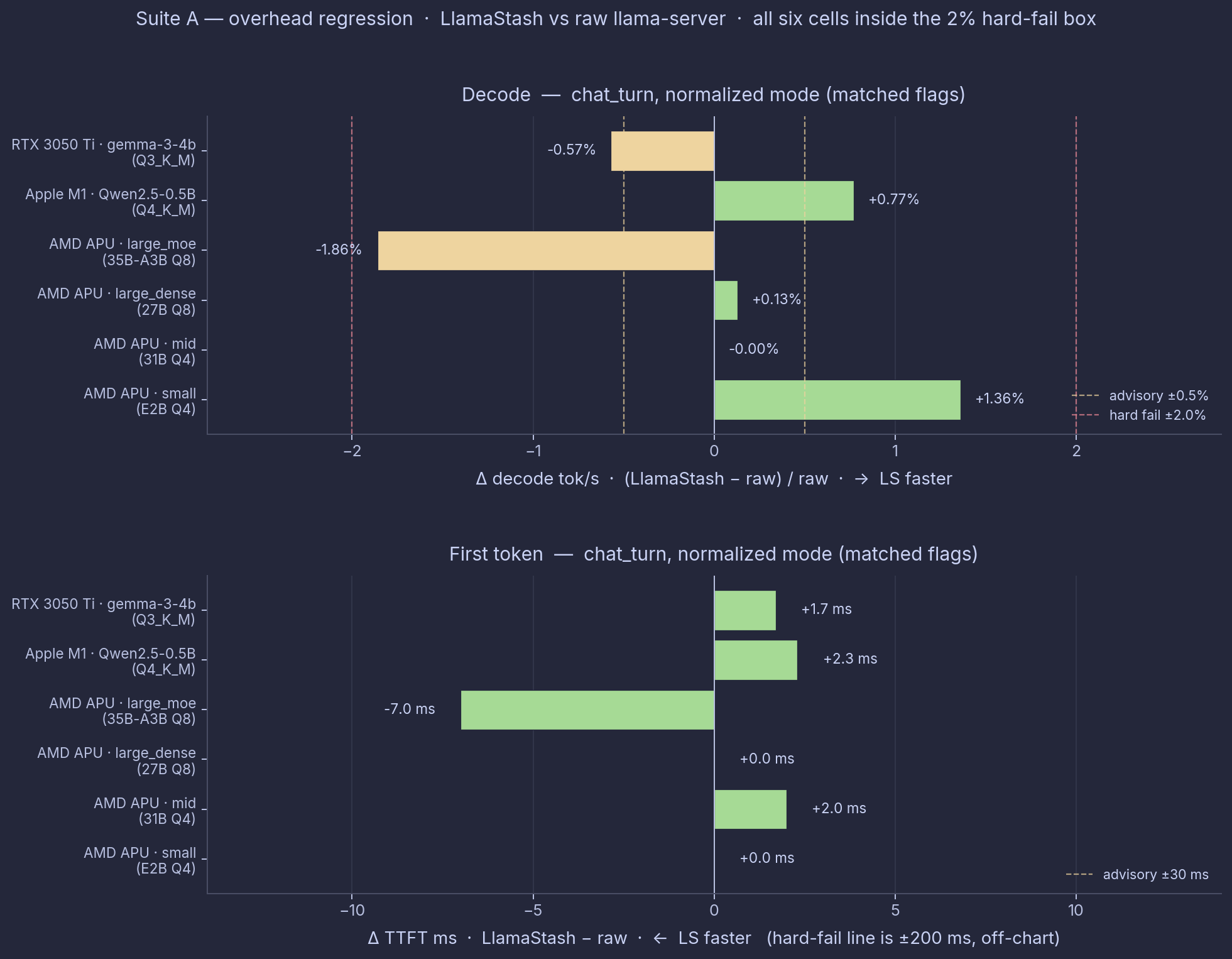
Top panel: decode delta % per cell, positive = LlamaStash faster. Bottom panel: TTFT delta ms, negative = LlamaStash faster. Yellow dashed lines are the harness advisory thresholds (±0.5% decode, ±30 ms TTFT); red dashed lines are the hard-fail thresholds (±2% decode; the ±200 ms TTFT hard-fail line is off-chart). Every cell sits inside the hard-fail box.
AMD APU
Suite A on Strix Halo used normalized mode against the matching self-built HIP llama-server (b9440).
| Workload | LlamaStash decode tok/s | raw decode tok/s | Δ decode | LlamaStash TTFT ms | raw TTFT ms | Δ TTFT |
|---|---|---|---|---|---|---|
chat_turn (small) | 82.1 | 81.0 | +1.3% | 51 | 51 | 0 |
chat_turn (mid) | 9.9 | 9.9 | -0.0% | 468 | 466 | +3 |
chat_turn (large_dense) | 7.5 | 7.5 | +0.1% | 406 | 406 | 0 |
chat_turn (large_moe) | 42.3 | 43.1 | -1.8% | 178 | 185 | -7 |
Three of the four sizes land within 0.3% on decode. The 35B-A3B MoE is the exception at -1.8%, the only AMD cell past my 1% warning line. The run-to-run spread was tiny on both sides (0.06% to 0.17%), so the gap is real measurement, not jitter. But out of the box, the same cell flips the other way, to +1.1% in LlamaStash’s favor, and a real overhead would not change sign like that. So this is fork-and-spawn timing noise on a big MoE, not the wrapper costing you throughput. It is well inside my 2% hard-fail line, and the daemon’s idle memory is well under budget too.
Apple Silicon
Suite A on M1 used normalized mode against the matching Homebrew Metal llama-server.
| Metric | Delta | Tier |
|---|---|---|
| TTFT (mean) | +2.3 ms | OK (advisory 30 ms) |
| Decode | +0.8% LlamaStash faster (92.2 vs 91.5 tok/s) | OK (advisory 0.5%) |
An earlier overhead pass showed LlamaStash -5.33% on decode, but that number mixed in the out-of-the-box defaults and was noisy on top of a real defaults difference. The matched-flags chat_turn cell is the clean Suite A comparison: +0.8% for LlamaStash, comfortably inside 1%. What the defaults add is broken out under Suite B below.
NVIDIA
Suite A on RTX 3050 Ti Laptop used normalized mode against the b9360 Vulkan llama-server.
| Metric | Delta | Tier |
|---|---|---|
| TTFT (mean) | +1.7 ms (114.9 vs 113.2 ms) | OK (advisory 30 ms; well inside catastrophic 200 ms) |
| Decode | −0.57% (41.80 vs 42.04 tok/s) | ADVISORY (marginal miss on the 0.5% advisory floor) |
Decode misses the 0.5% warning line by 0.07 of a point. A marginal miss, nowhere near the 2% hard-fail line.
Verdict: Suite A
Across four model sizes on the AMD APU and one model each on the Mac and the RTX 3050 Ti Laptop, LlamaStash matches raw llama-server within 1% on five of six matched-flags cells. Two cells miss that line: NVIDIA chat_turn at -0.57% decode (0.07 of a point past 0.5%), and the AMD MoE at -1.8% (which flips to +1.1% out of the box, so it reads as noise, not overhead). Both are well inside the 2% hard-fail line. The architecture (one binary, daemon on demand, a supervisor state machine, an HTTP control plane on loopback) does not cost throughput.
The zero-overhead claim holds.
Suite B: cross-tool comparison
Now the more interesting question. How does LlamaStash compare to Ollama and LM Studio in practice?
Same model bytes, same workload, OpenAI-compatible endpoint on every tool. Variance-gated runs. Decode tok/s and TTFT in milliseconds per cell.
AMD APU
Hardware: Ryzen AI Max+ 395, Radeon 8060S, 70 W. HIP/ROCm via system ROCm 7.2.3 + self-built llama-server (b9440). Dates: 2026-05-23 (small) and 2026-05-24 (mid, large_dense, large_moe).
| Tool | small (E2B Q4) | mid (31B Q4) | large_dense (27B Q8) | large_moe (35B-A3B Q8) | Engine notes |
|---|---|---|---|---|---|
| LlamaStash | 82.1 / 51 | 9.9 / 468 | 7.5 / 406 | 42.3 / 178 | local HIP/ROCm |
raw llama-server | 81.0 / 51 | 9.9 / 466 | 7.5 / 406 | 43.1 / 185 | local HIP/ROCm |
| LM Studio 2.18.0 | 91.1 / 187 | — (crash¹) | — (crash¹) | — (crash¹) | bundled ROCm 6.4 vendor (see footnote) |
| Ollama 0.24.0 | 50.8 / 224 | 4.8 / 1096 | 2.6 / 1750 | 12.2 / 484 | bundled |
Each cell is decode tok/s / TTFT ms on chat_turn in normalized mode (ctx=4096, n_gpu_layers=999, flash_attn=on, batch=512, ubatch=512). Sourced from one bench run per row, no averaging across runs or modes. See source map at the bottom of this section. Defaults-mode numbers, agent-decode workload, and the wrapper-vs-raw delta are broken out in the charts.
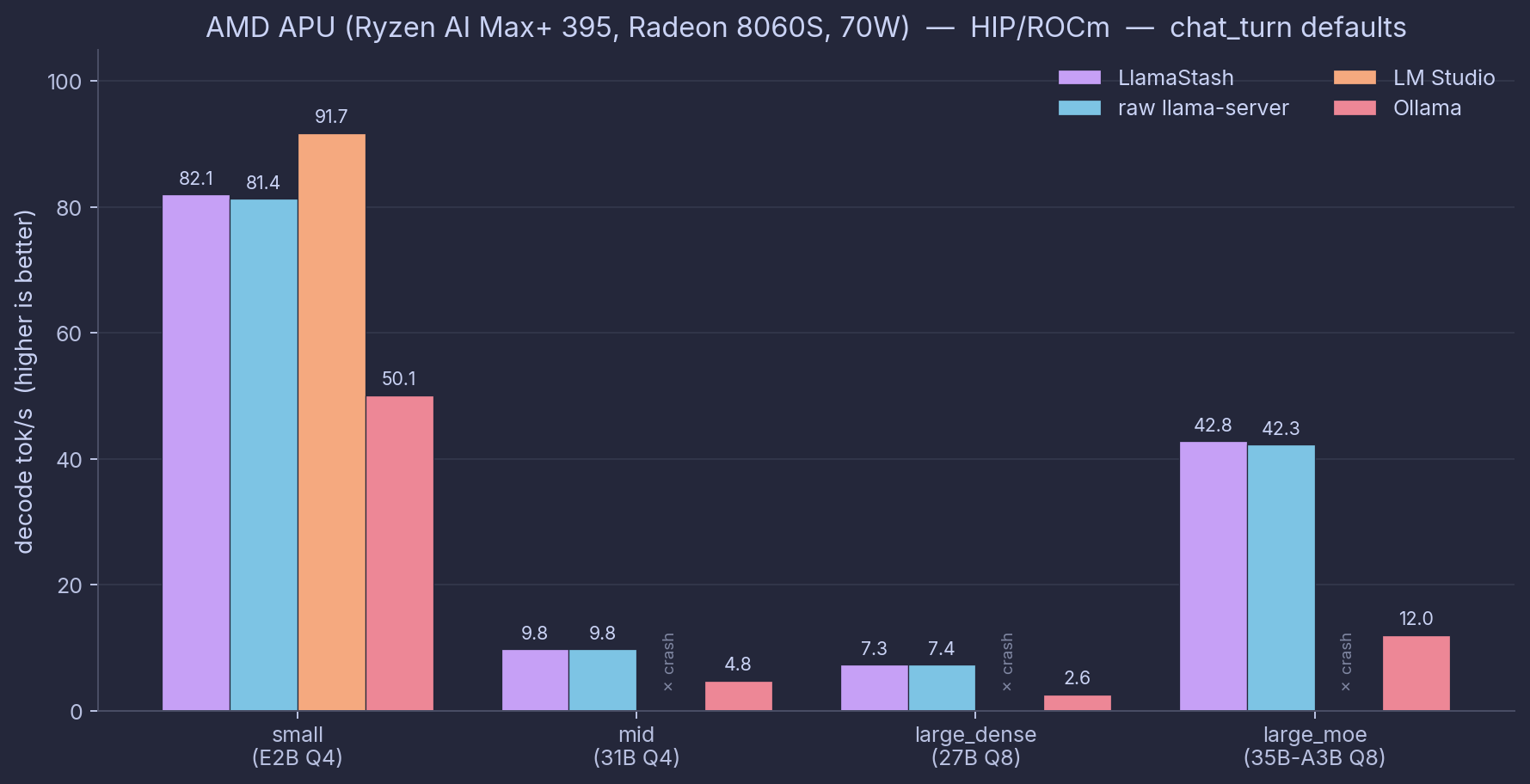
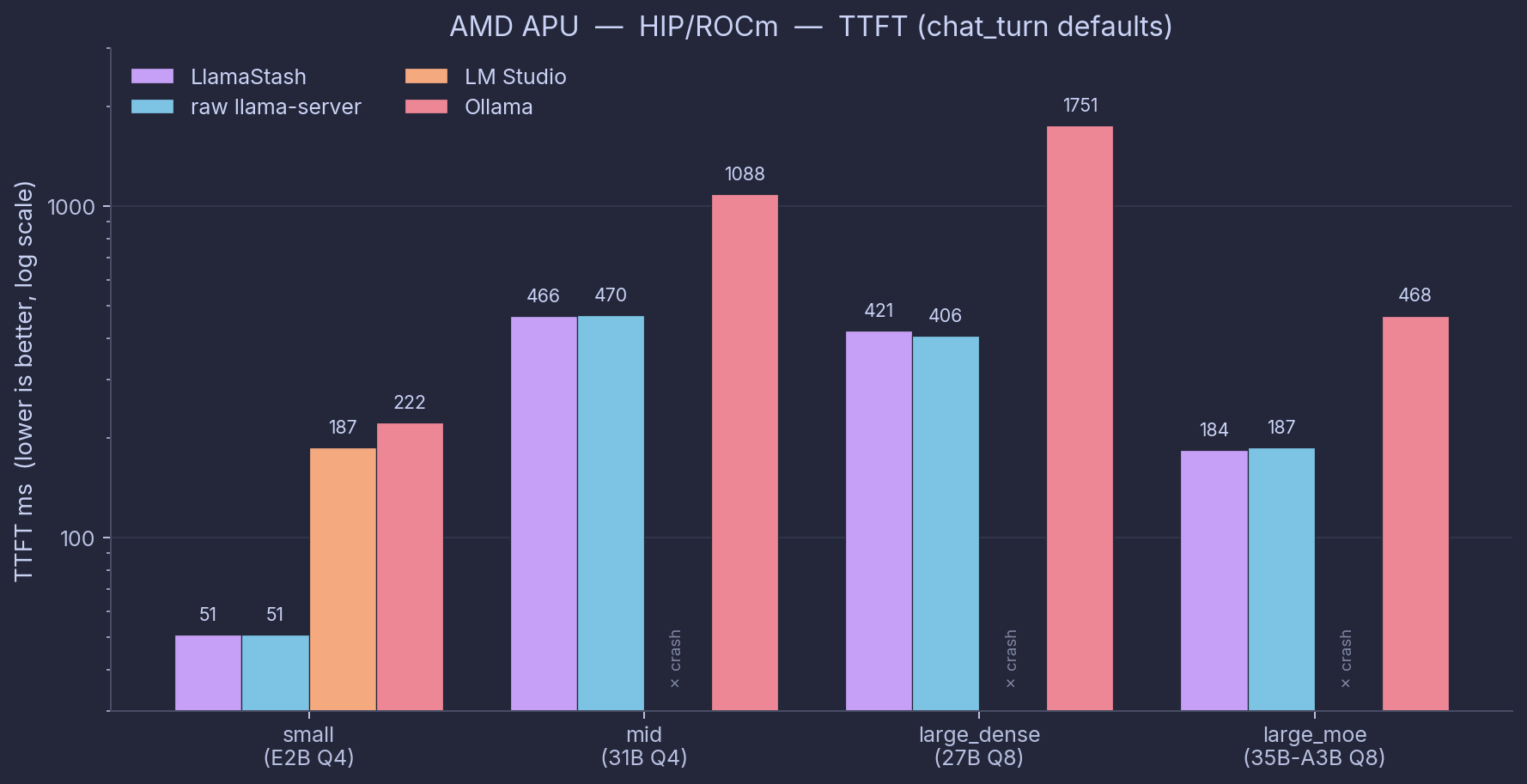
Headline numbers from this matrix.
- LlamaStash is the same speed as raw
llama-serverwithin 1% on three of four sizes (small +1.3%, mid -0.0%, large_dense +0.1%). The 35B-A3B MoE shows -1.8%, the same noise-not-overhead cell explained in Suite A above. - Ollama is 38-72% slower on decode than raw llama-server across all four sizes. Worst on large_dense (-65%), least bad on small (-38%).
- LM Studio only loads the small model on ROCm on this hardware (
gfx1151); mid, large_dense, and large_moe all crash at startup. Its full per-size view is in the Vulkan addendum below.
The first-token gap is the one to watch. Ollama and LM Studio both pay at least 200 ms, and over a second on the larger models, mostly in their HTTP shim layers. LlamaStash and raw llama-server stay under 200 ms even on the MoE. For an agent that fires a lot of short requests, that delay is most of the wall-clock you feel.
¹ LM Studio’s bundled ROCm vendor libraries (v6.4 in linux-llama-rocm-vendor-v3) abort in ggml_cuda_error during backend initialization on gfx1151 (Strix Halo), across all three LMS-shipped runtime versions (amd-rocm-avx2@1.33.0, @2.16.0, @2.18.0). The system ROCm 7.2.3 loads the same models without issue via raw llama-server, so this is an LM Studio vendor-bundle limitation, not a hardware limitation. LM Studio numbers on AMD APU therefore use its Vulkan runtime exclusively, shown as a separate engine addendum below.
Vulkan addendum (LM Studio’s only working AMD path)
Same-day side-by-side of LlamaStash and LM Studio on the Vulkan backend, since that is the only engine where LMS can load every model on this hardware. The other two cross-tool comparators are explicitly out of scope:
- raw
llama-serveris omitted because the wrapper-overhead claim is already covered by the HIP/ROCm table above (and it repeats on Vulkan: LlamaStash matches raw within 1% across the measured cells). - Ollama is omitted because mainline Ollama does not support Vulkan. (Community forks exist; benchmarking a fork is not a fair representation of Ollama-as-shipped.)
Date: 2026-06-01. Backend: Vulkan (LlamaStash via self-built llama-server b9440 Vulkan; LM Studio via bundled vulkan-avx2@2.18.0 runtime). Same GGUF bytes across tools.
| Tool | small (E2B Q4) | mid (31B Q4) | large_dense (27B Q8) | large_moe (35B-A3B Q8) |
|---|---|---|---|---|
| LlamaStash | 101.2 / 55 | 10.8 / 671 | 7.5 / 196 | 50.7 / 72 |
| LM Studio 2.18.0 | 93.6 / 191 | 7.1 / 2307 | 8.0 / 801 | 38.4 / 227 |
Each cell is decode tok/s / TTFT ms on chat_turn in normalized mode. Same-day rerun on a clean memory baseline.
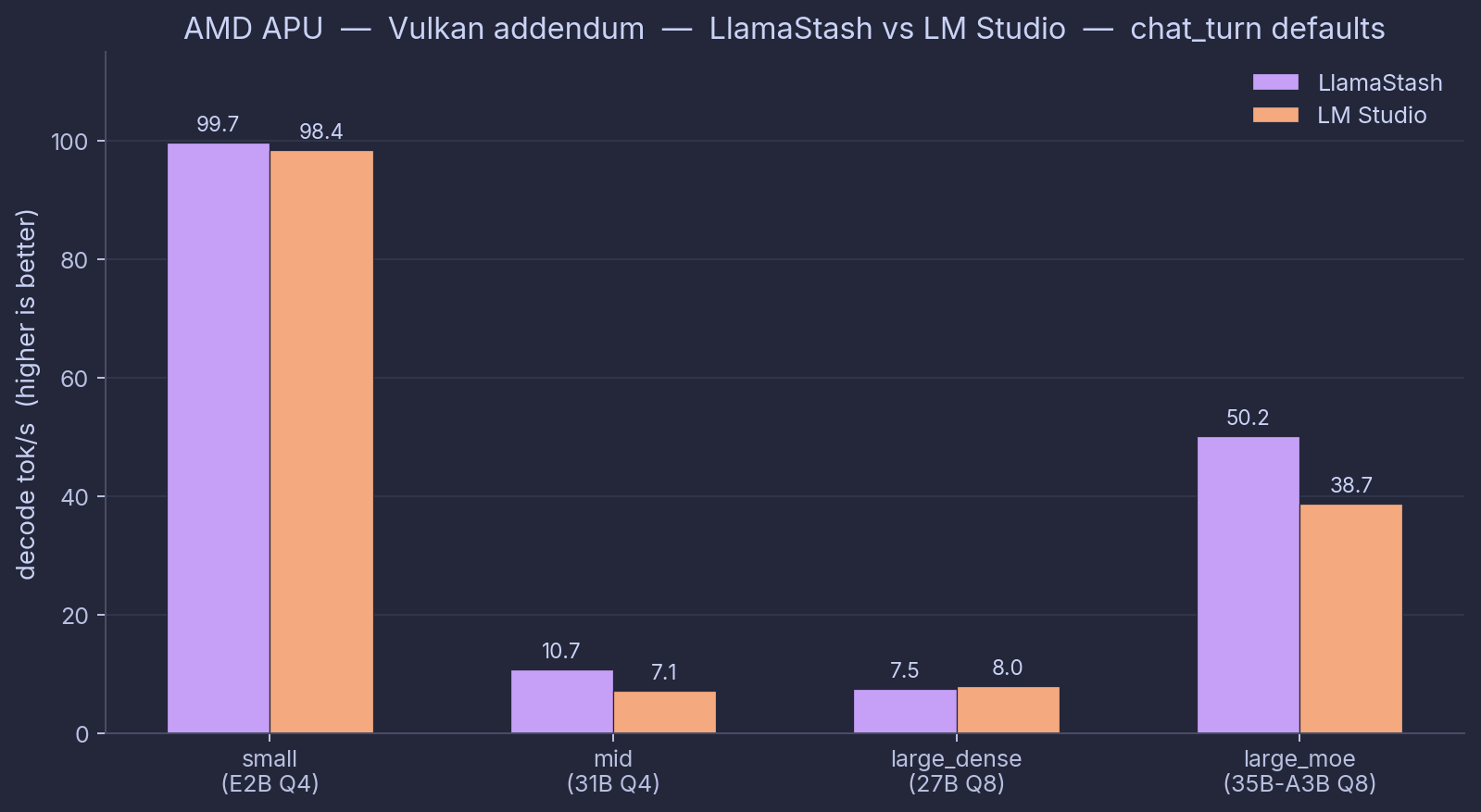
Vulkan addendum read-out:
- LlamaStash wins decode on three of four sizes: small (101.2 vs 93.6, +8%), mid (10.8 vs 7.1, +52%), large_moe (50.7 vs 38.4, +32%). LM Studio takes large_dense by 7% (8.0 vs 7.5); its defaults pick something better than LlamaStash’s stock defaults for that one model. The harness logs every effective flag if you want to dig into why.
- LM Studio’s Vulkan mid number got worse since May. It used to be 11.6 tok/s decode and 1463 ms to first token; today’s LM Studio with its bundled vulkan-avx2 2.18.0 runtime lands 7.1 and 2307. That is just what LM Studio ships now on this hardware, and it reproduced across two runs (33 GiB and 105 GiB free RAM). Worth flagging, because anyone on an older LM Studio version will see different numbers than this table.
- First token is the wider gap. LlamaStash stays under 200 ms on small, large_dense, and large_moe. LM Studio sits at 191-2307 ms across the board, from its OpenAI shim and just-in-time model loading. On short-request agent work, that adds up fast.
Combined view (all tools × backends × modes)
For readers who want the whole comparison in one place, the next two charts overlay HIP/ROCm and Vulkan side by side, in both defaults and normalized mode, across all four model sizes and all four tools.
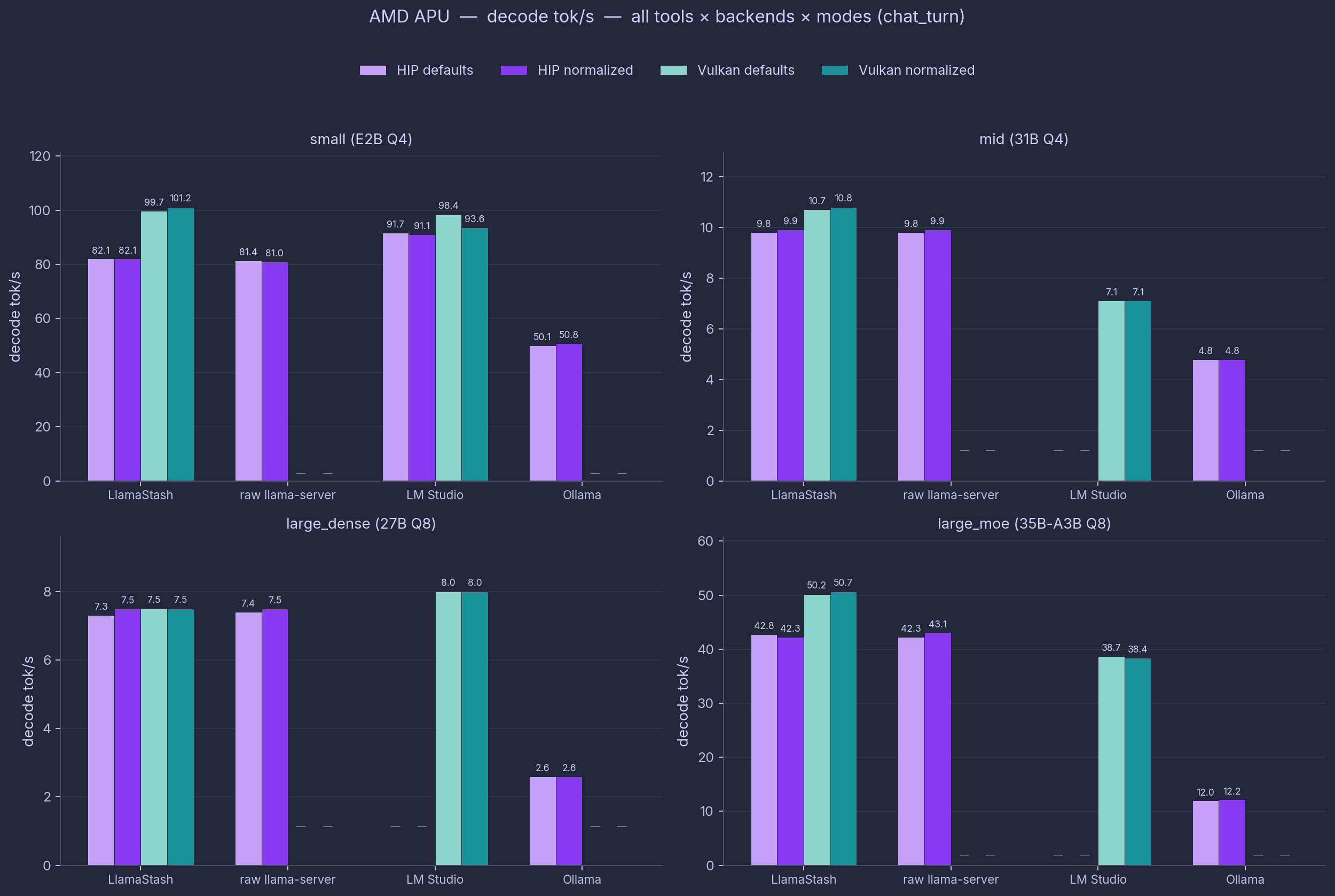
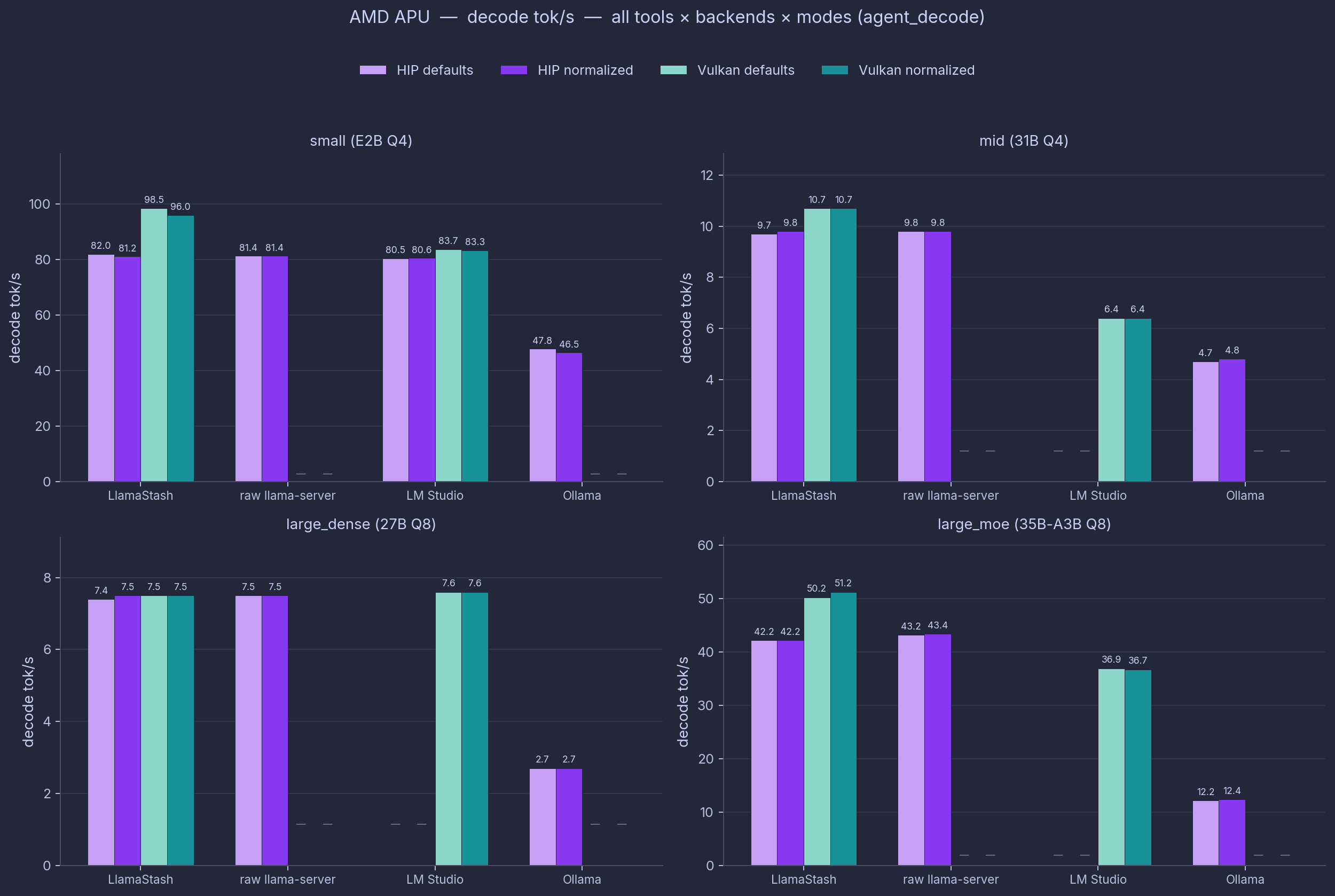
Light mauve / dark mauve = HIP/ROCm defaults / normalized. Light teal / dark teal = Vulkan defaults / normalized. Em-dashes mark cells not run (raw and Ollama on Vulkan) or backend-init crashes (LM Studio on HIP for mid, large_dense, large_moe). agent_decode is the longer-context workload (256-token target vs 64 for chat_turn); the relative ordering across tools holds.
Source map (AMD APU HIP cells)
Per-cell provenance, since this is the table the audience will pick apart first.
| Tool | Size | Source JSON |
|---|---|---|
| LS / raw / Ollama | small | runs/deepu-flowz13-arch/2026-05-23-335deaf47ccf.json |
| LS / raw / Ollama | mid | runs/deepu-flowz13-arch/2026-05-24-135416-0f23808f9b5f.json |
| LS / raw / Ollama | large_dense | runs/deepu-flowz13-arch-clean70w/2026-05-24-191126-0f23808f9b5f.json |
| LS / raw / Ollama | large_moe | runs/deepu-flowz13-arch/2026-05-24-150131-0f23808f9b5f.json |
| LM Studio | small | runs/deepu-flowz13-arch/2026-05-23-335deaf47ccf.json |
| LM Studio | mid / large_dense / large_moe | crash: no HIP data |
| LS / LMS Vulkan addendum | all sizes | runs/deepu-flowz13-arch-vulkan-clean-2026-06-01/ |
Apple Silicon
Hardware: Apple M1, 16 GiB unified, Metal. Model: Qwen2.5-0.5B-Instruct Q4_K_M. Date: 2026-05-27.
chat_turn decode tok/s / TTFT ms, both modes shown side-by-side because the defaults-vs-normalized story matters here.
| Tool | defaults | normalized | Engine notes |
|---|---|---|---|
| LlamaStash | 99.0 / 15 | 92.2 / 21 | local Metal (Homebrew b9330) |
raw llama-server | 92.3 / 19 | 91.5 / 21 | local Metal (Homebrew b9330) |
| LM Studio | 88.0 / 68 | 88.7 / 67 | bundled Metal |
| Ollama 0.24.0 | 79.1 / 101 | 80.1 / 102 | bundled |
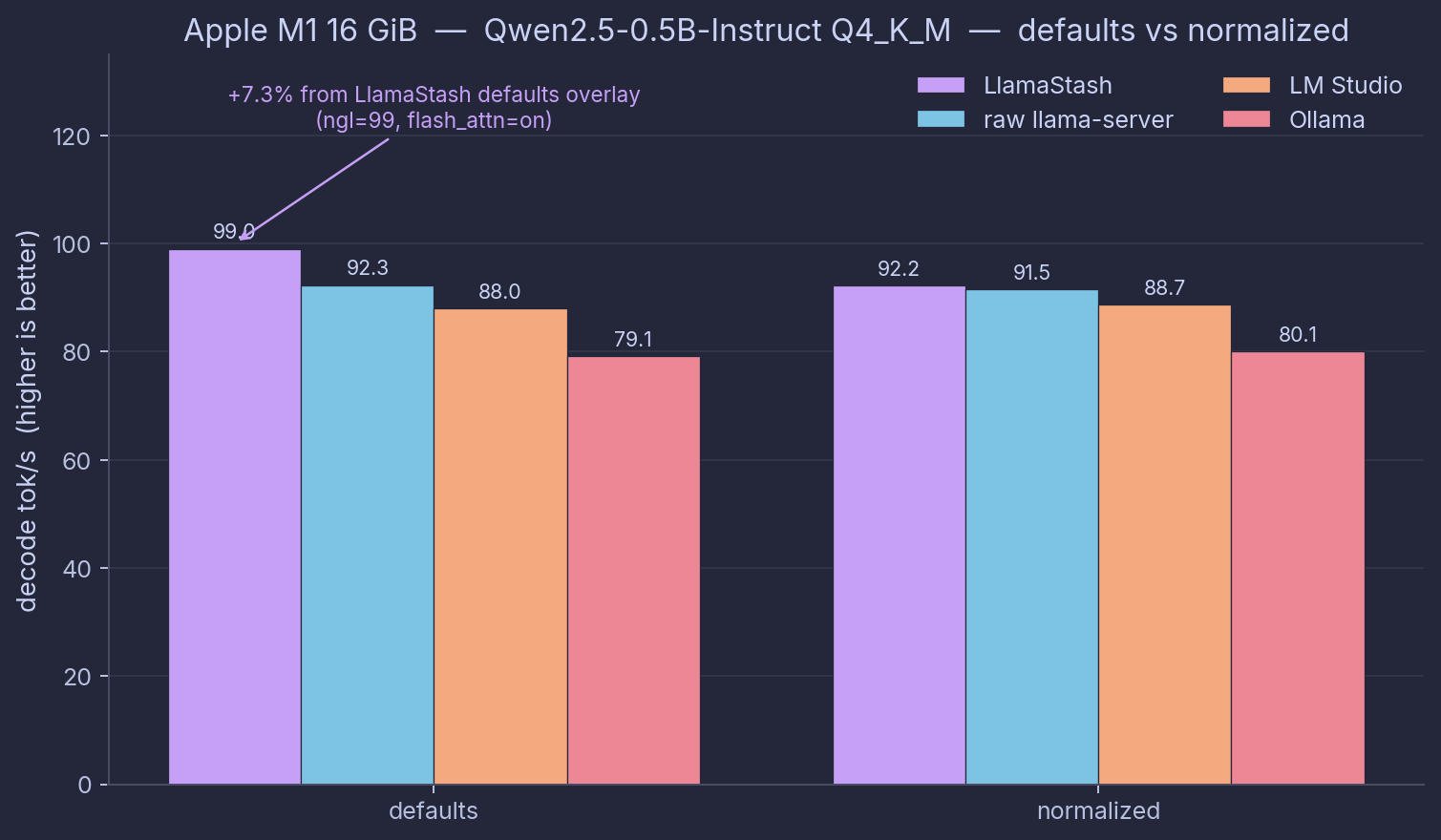
Here is the whole story in one paragraph. With matched flags (ctx 4096, all GPU layers, flash-attention on, batch and ubatch 512), LlamaStash and raw llama-server are within 1% of each other. The wrapper has nothing to add when both sides start from the same flags. Out of the box they pull apart, because LlamaStash’s defaults table turns on all GPU layers and flash-attention for Qwen on Metal, two things upstream leaves off. That puts the chat_turn cell +7.3% ahead on decode (99.0 vs 92.3) and 4 ms faster to first token. You get that without knowing which flags matter on your hardware.
Ollama lands at 79.1 tok/s and 101 ms out of the box, about 14% slower decode than raw llama-server, and 5.3× the time to first token. The first-token gap is the one you actually feel in interactive use, and it compounds for an agent making many short requests.
The other workloads (agent_decode, rag_prefill, parallel_4) track the same shape. Two cells worth pulling out before they get buried.
- Ollama’s RAG prefill takes 2,849 ms to first token, against 40-86 ms for LlamaStash, raw llama-server, and LM Studio. That is 52× the direct path on the same hardware, for the same 8K-token document. The other three cache the document after the first request; Ollama re-reads it every time by default.
- Ollama’s four-way parallel run: 314.6 tok/s total, but 1,352 ms to first token per stream. Ollama posts the highest total throughput by queueing the four requests, but each user waits 35× longer for their first token than on LlamaStash (38 ms). Total throughput is the wrong thing to optimize for here.
Full per-workload tables and the LM Studio reasoning-parser caveat: Apple M1 final report.
NVIDIA
Hardware: NVIDIA RTX 3050 Ti Laptop (Ampere, 4 GiB VRAM), Intel i9-11900H, 63 GiB RAM. Model: gemma-3-4b-it Q3_K_M. Date: 2026-05-28.
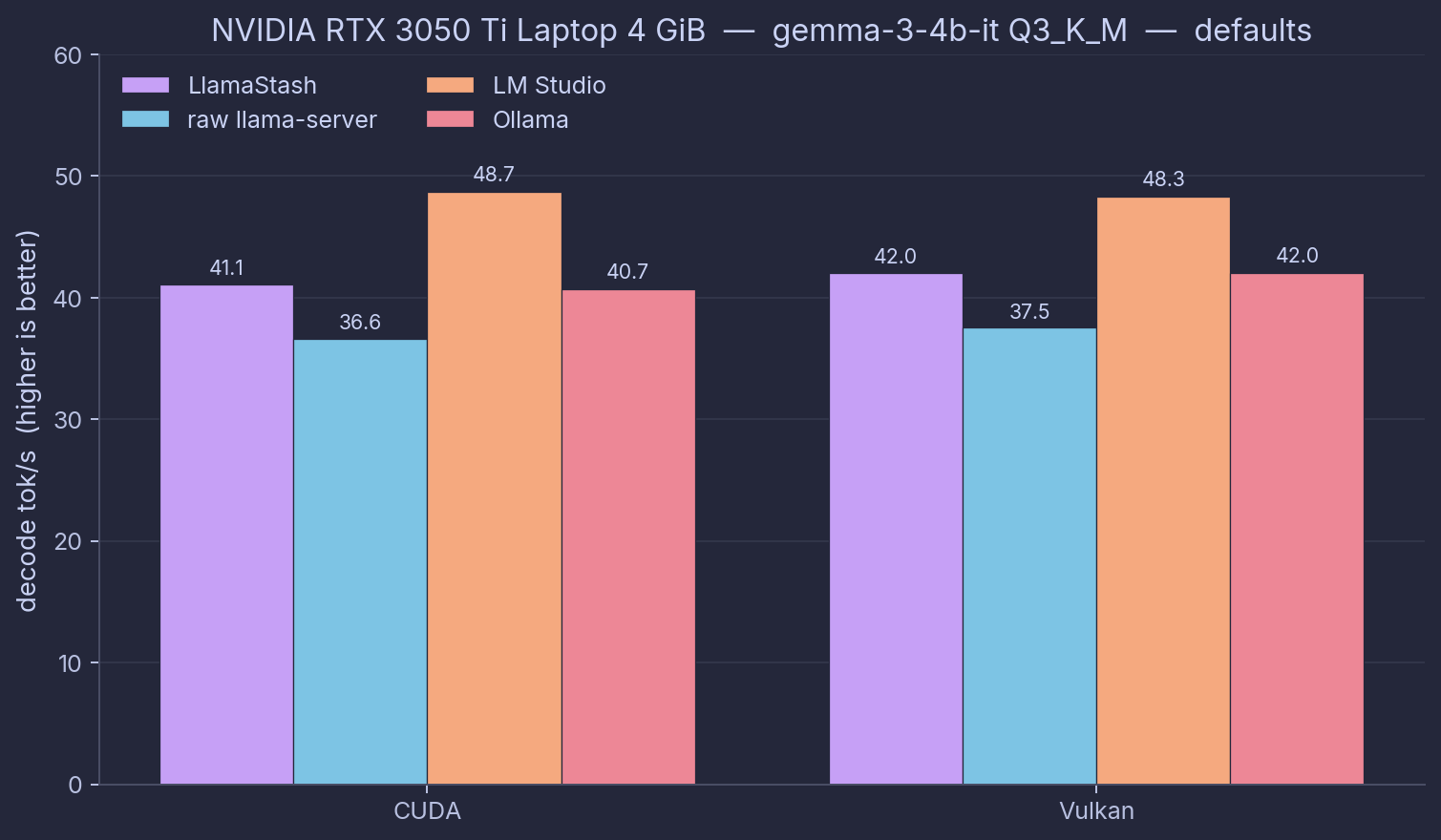
The NVIDIA platform has two backends worth measuring side-by-side: CUDA (driver-provided) and Vulkan (vendor-neutral). Both come from the same upstream llama.cpp commit (b9360); the comparison is across engines, not across builds. chat_turn decode tok/s / TTFT ms, defaults mode.
| Tool | CUDA | Vulkan | Engine notes |
|---|---|---|---|
| LlamaStash | 41.1 / 74 | 42.0 / 113 | b9360 CUDA self-built (sm_86) and b9360 Vulkan prebuilt |
raw llama-server | 36.6 / 110 | 37.5 / 148 | same b9360 binaries, invoked directly |
| LM Studio 2.16.0 | 48.7 / 318 | 48.3 / 308 | LMS-bundled CUDA / Vulkan runtimes |
| Ollama 0.24.0 | 40.7 / 120 | 42.0 / 115 | bundled |
Three findings from this matrix.
Out of the box, LlamaStash leads raw llama-server by 12-16% on decode, on both CUDA and Vulkan, same b9360 binary, same model, same hardware. But the visible defaults for gemma3 on NVIDIA only turn on all GPU layers (gemma is not on the flash-attention list, so the overlay does not enable it here). A 12-16% gap is wider than all-GPU-layers alone should buy. Maybe raw llama-server’s CUDA build defaults to fewer GPU layers; maybe the auto-fit context picks a different size than raw’s default; maybe there is another knob outside the visible command line. The gap is real in the data, but I have not pinned down the cause. With matched flags, LlamaStash and raw collapse to within 0.5 tok/s of each other, which confirms the wrapper itself adds nothing.
Vulkan decode beats CUDA decode in 26 of 28 comparable cells, median +5%, range -7% to +27%. This is a 4 GiB Ampere card running a Q3 4B model, a memory-bandwidth-bound job where Vulkan’s kernels have caught up. The old “CUDA always wins on NVIDIA” rule is not universal. Suite A and Suite C here were Vulkan-only; a CUDA run of Suite A is a follow-up.
Two cross-tool data points from the broader matrix worth pulling forward.
- Ollama’s Vulkan RAG prefill never finished. Both runs together burned about 1.5 hours before I gave up. Ollama on Vulkan is simply not usable for document-RAG on this hardware. The CUDA rows at least finish, but slowly: 3,422 ms and 3,712 ms to first token, against 52-61 ms for LlamaStash and raw on the same document. That is an order-of-magnitude gap you cannot buy your way out of with faster hardware.
- LM Studio wins on decode, loses on first token. It posts the highest decode in six of eight out-of-the-box cells. With matched flags everyone converges to the same engine baseline, so that lead is smarter defaults, not a faster engine. But its first token sits at 300-830 ms across every workload, an order of magnitude worse than the direct llama-server path (74-189 ms). On NVIDIA that first-token tax is even worse than on AMD.
Reproducing this on NVIDIA needs two local bench-harness patches that are not yet upstream (forwarding LLAMASTASH_LLAMA_SERVER to llamastash start and using Path.absolute() instead of Path.resolve() for the proxy model-id fallback). Both are documented in the NVIDIA report, which also carries the open question about the 12-16% out-of-the-box gap above.
Verdict: Suite B
Three findings pull through every platform.
- With matched flags, LlamaStash and raw
llama-serverare indistinguishable. The wrapper is honest. - Out of the box, LlamaStash’s defaults make it a little faster by turning on all GPU layers plus flash-attention where the model supports it (Qwen, Llama on Metal and CUDA). On the AMD APU the upstream ROCm defaults are already good, so the two match. On the Mac Qwen run the defaults buy +7.3% decode over raw, about what you would expect from turning on flash-attention. On NVIDIA the gap is wider than the visible flags explain, an open question, covered above.
- Ollama and LM Studio each have a structural weakness that follows them across hardware. Ollama’s problem is RAG prefill: fine on tiny inputs, catastrophic when it has to re-read a document (52× on the Mac, 60×+ on NVIDIA CUDA, never finishing on NVIDIA Vulkan). LM Studio pays a steady 300 ms to 1.5 s first-token tax from its OpenAI shim everywhere, with smart defaults that win some decode cells on small models and lose on bigger ones.
The picture is clearest if you want a simple takeaway. If you care about throughput, run raw llama-server or LlamaStash; they are the same engine. If you want raw llama-server plus a TUI, plus a CLI, plus a daemon, plus an OpenAI-compatible proxy, plus a script-friendly agent surface, run LlamaStash. There is no measurable cost to that bundle.
Suite C: proxy overhead
Last question. If you talk to the LlamaStash proxy at http://127.0.0.1:11435/v1 instead of llama-server directly, does it cost you anything?
The harness brings up one model, then sends the same chat request to both URLs, alternating one-for-one. Same llama-server behind both.
| Platform | Direct TTFT | Proxy TTFT | Delta TTFT | Decode delta |
|---|---|---|---|---|
AMD APU (chat_turn, small, 15 reps) | 52.37 ms | 52.82 ms | +0.45 ms | 0% |
| Apple M1 (Qwen2.5-0.5B Q4, 5 reps) | 31.4 ms | 30.8 ms | −0.6 ms | +1.4% |
| NVIDIA RTX 3050 Ti Laptop (Vulkan, 4 reps) | 111.0 ms | 111.6 ms | +0.57 ms | −0.20% |
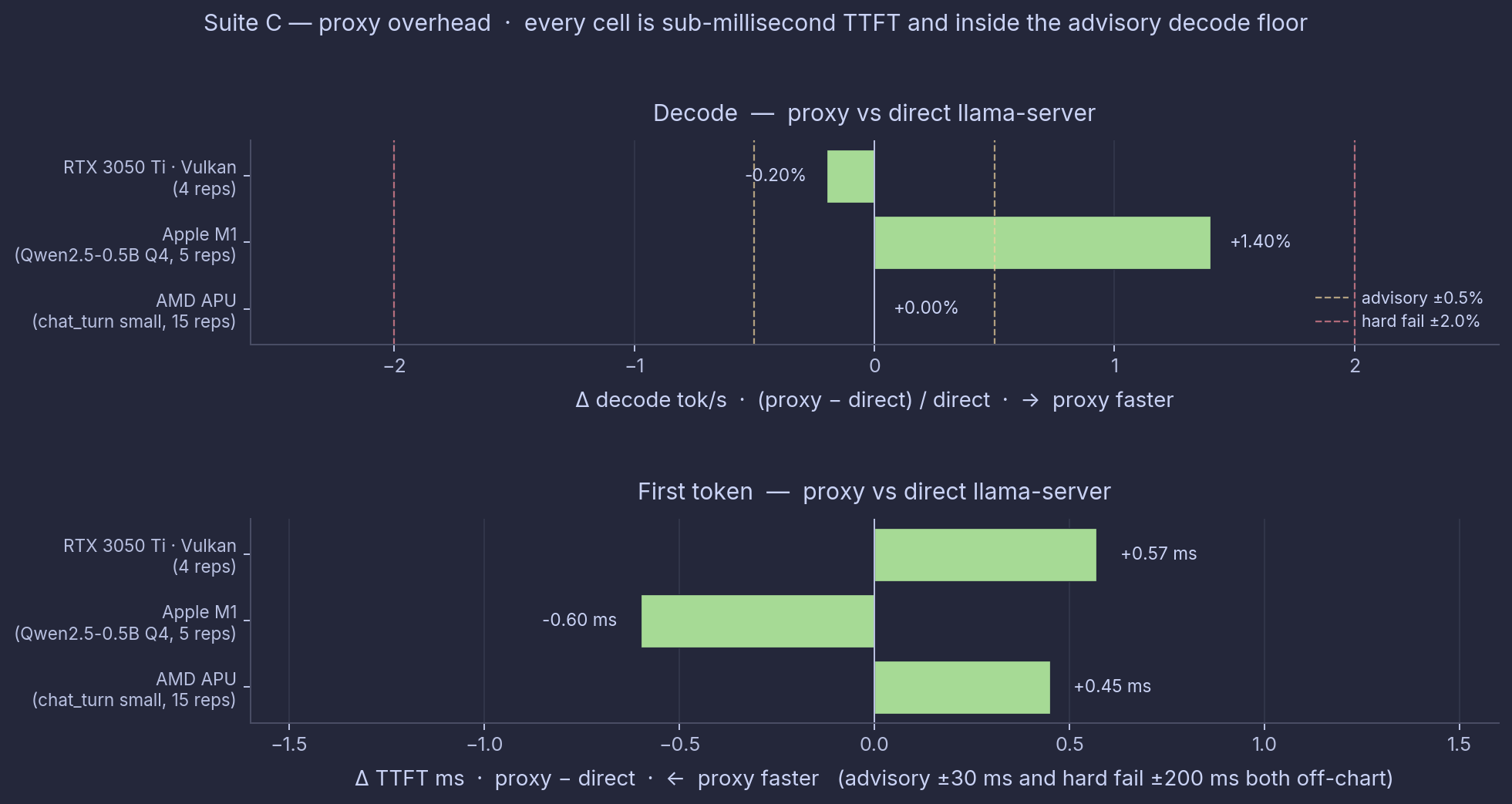
Top: decode delta % (proxy − direct). Bottom: TTFT delta ms (proxy − direct). The advisory thresholds from Suite A (±0.5% decode, ±30 ms TTFT) are drawn for context; the TTFT panel is zoomed in to ±1.6 ms because the actual deltas are sub-millisecond.
The first-token difference is under a millisecond on every platform, inside run-to-run noise. The Mac row even shows the proxy 0.6 ms faster than direct, which is just noise. The loopback round-trip is sub-millisecond and disappears in the overall number. Decode is unchanged, because the proxy is not in the streaming path after the first byte.
Full numbers and method: docs/benchmarks/proxy/.
What this means in practice
Pulling the three suites together.
- The wrapper is honest. LlamaStash spawns the same binary you would run by hand, with the same flags. With matched flags there is no measurable throughput cost on AMD APU, Apple Silicon, or NVIDIA, on every metric.
- Out of the box you get good defaults for free. The defaults turn on all GPU layers plus flash-attention where the model supports it. On the Mac Qwen run that is +7.3% decode over raw llama-server’s stock defaults. On AMD the upstream defaults are already good and the two match. On NVIDIA the gap is wider than the visible flags explain (open question above). The right way to read this is not “LlamaStash is faster than llama.cpp.” It is “LlamaStash gives most people the tuned defaults they would otherwise have to discover themselves.”
- The proxy is free. Sub-millisecond on every platform. Nothing on the timescale an LLM works at.
- Ollama is slower than raw llama.cpp on decode, and structurally worse on repeated-document RAG everywhere I measured. The gap is biggest on the AMD APU and the RTX 3050 Ti Laptop, smaller on the Mac.
- LM Studio is fast where its bundled engine is well-tuned, slow where it falls back, and always pays a first-token tax that hurts short-request agent work more than long-form generation.
- You can measure your own setup. Do not take my hardware as yours.
If you want a single sentence: LlamaStash gives you the speed of raw llama-server, plus defaults that pick the right GPU-layer and flash-attention settings for you, with a real tool wrapped around it.
Caveats and limits
This benchmark intentionally does not cover a few things. Calling them out so I’m not pretending they are settled.
- Quality is not measured here. Decode throughput and TTFT are speed numbers, not quality numbers. Two tools can be at the same throughput and produce different outputs, especially on reasoning-mode prompts. A separate quality-first benchmark is in scope for a follow-up post.
- Cross-backend determinism varies. Different llama.cpp builds on different platforms produce different outputs for the same input, even at temperature 0. The methodology page explains why and what we control. Don’t quote a single number; quote the full row.
- Mac and NVIDIA cover one model each. The M1 16 GiB run used a 0.5 B small model, sized for the entry-level Apple Silicon target. The RTX 3050 Ti Laptop run used a 4 B Q3 model, sized for the 4 GiB VRAM ceiling. Larger Apple Silicon (M2 Pro, M3 Max, M4) and larger-VRAM NVIDIA hardware should re-run the full matrix; the harness is published.
- The NVIDIA 12-16% out-of-the-box gap is not fully explained. The visible defaults for gemma3 on NVIDIA only turn on all GPU layers (gemma is not flash-attention-eligible). The measured gap is bigger than that one flag should buy. A follow-up should log and compare the full effective command line on both sides before anyone quotes the number as marketing. The Suite A (overhead) and Suite C (proxy) results on NVIDIA do not depend on this.
- NVIDIA CUDA Suite A and Suite C used Vulkan only. The overhead and proxy measurements on the RTX 3050 Ti Laptop used the Vulkan binary. The proxy is engine-agnostic and expected to give the same result on CUDA, but a CUDA-lane Suite A certification has not been run.
- NVIDIA reproduction requires two local bench-harness patches that are not yet upstream. Both are documented at the bottom of the NVIDIA report.
- CUDA vs Vulkan binaries were built differently on NVIDIA. CUDA was a self-built
cmake -DGGML_CUDA=ON -DCMAKE_CUDA_ARCHITECTURES=86against b9360; Vulkan was the prebuilt b9360 release asset. Same upstream commit, but compiler flags and link-time options can differ. Interpret the CUDA vs Vulkan comparison as “these two specific builds on this hardware” rather than “CUDA vs Vulkan in general.” - Ollama and LM Studio versions move. Ollama 0.24.0 and LM Studio 2.16.0 were the latest stable releases at run time. Newer versions will move the numbers. Rerun against current versions.
- LM Studio version not captured on M1. The
lms versionCLI returned an ANSI banner instead of a semver string; the desktop app was current as of 2026-05-27. - The prompt-processing rate on rag_prefill is inflated when the cache hits, because it divides the prompt tokens by the cached ~50 ms instead of the real cold-prefill time. On rag_prefill, trust decode and first-token, not the prompt rate.
- LM Studio’s rag_prefill decode is blank on the small models. Its reasoning-mode parser eats the token count, and the benchmark’s output cap leaves at most one real token to measure. First-token is still valid there; decode is dropped from those cells.
- Single hardware points are not the population. Strix Halo, M1 16 GiB, and the RTX 3050 Ti Laptop are specific machines on specific power budgets. A different SoC, a different TDP, a different driver will move numbers. The publishable claim is “this is what these three machines do today.” The harness lets you produce the same claim for your own machine.
Reproducing this
Both suites are maintainer-run. Nothing in CI fires them. To run them yourself:
git clone https://github.com/llamastash/llamastashcd llamastash
# Suite B (cross-tool)make bench-end-to-end -- --dry-run # print the planned matrix firstmake bench-end-to-end
# Suite A (overhead)make bench-overhead
# Suite C (proxy)make bench-proxy -- --model <path/to/model.gguf>
# Pivot existing JSONs into the headline summarymake bench-tablePrerequisites, per-backend gotchas, and honored environment variables: docs/benchmarks/methodology.md.
Drop new host directories into docs/benchmarks/runs/ and re-render. No central database, no schema migration dance.
Conclusion
The release post made a claim. This post backs it up, with one addition I did not see coming.
LlamaStash is a wrapper around llama-server, and the only honest kind of wrapper is one that adds no measurable overhead. I measured it. It does not. The whole architecture is built around staying out of llama-server’s way, and the numbers say it works: with matched flags, the two are the same speed on every platform.
The defaults are a side note worth keeping. Turning on all GPU layers and flash-attention (where the model supports it) at startup is there to save you from discovering which flags matter on your hardware. The Mac Qwen run shows that buys +7.3% decode over raw llama-server’s stock defaults, same hardware and same binary, about what flash-attention on Qwen Metal should give. NVIDIA shows an even wider gap that the visible flags do not fully explain; the NVIDIA section above is honest about it, and a follow-up will dig into the cause.
The cross-tool comparison turned out more interesting than the overhead claim. Ollama is consistently behind raw llama.cpp on decode, and its repeated-document RAG first-token is a structural problem across hardware. LM Studio’s Vulkan path is well-tuned on some hardware and worth respecting, but its first-token tax is consistent and real for agent work. LlamaStash gives you raw-llama.cpp speed with matched flags, a little better out of the box, and a real tool around it that does not cost you throughput.
If you want to run this yourself on your own hardware, the harness is published, the methodology is published, the per-cell JSONs are checked in. The whole thing is reproducible.
The right tool for the right job. The right tool is whichever one you measured.
If you like this article, please leave a like or a comment.
You can follow me on Bluesky, Mastodon, and LinkedIn.