Introducing LlamaStash: a zero-overhead, terminal-native llama.cpp launcher
A fast TUI, CLI, daemon, and OpenAI-compatible proxy for running local LLMs via llama.cpp, in one Rust binary

Series · GNU/Linux Environment for Developers
Post 8 of 10
Series · GNU/Linux Environment for Developers
Post 8 of 10
- My beautiful Linux development environment
- Must have GNOME extensions
- Configure a beautiful terminal on Unix with Zsh
- My VS Code setup - Making the most out of VS Code
- The state of Linux as a daily use OS in 2021
- My sleek and modern Linux development machine in 2021
- My fully offline AI-assisted Linux development machine
- Introducing LlamaStash: a zero-overhead, terminal-native llama.cpp launcher
- Can Qwen 3.8 running on your laptop really replace Claude Opus for Agentic coding?
- Forget Claude Code. All you need is Qwen3.8-Flash-Next running locally for agentic coding
In my recent post about my fully offline AI-assisted Linux development machine, I dropped a small detail near the bottom. I run my local model with an alias.
llamaServerI described it as “a small script. It lets me pick a GGUF model, context size, and reasoning mode. It remembers the last choice, so most of the time I just start it and get going.”
That script grew up. Today I’m releasing LlamaStash, the first public release of a fast, cross-platform, terminal-native launcher for llama.cpp with zero overhead.
It is a TUI. It is also a CLI. It is also a background daemon. It is also an OpenAI-compatible proxy. One small Rust binary (~5 MB download), three personas, same primitives everywhere.
Why does this exist?
Well: ADHD, insomnia and the below 😆
Local LLMs sit in an awkward gap.
On one side, raw llama-server is fast and honest. It is also tedious. You memorize flags. You write wrapper scripts. You remember which port a model is on. You guess context sizes that may or may not fit your VRAM. After a while you have a ~/scripts/ folder full of shell aliases that nobody else can read.
On the other side, Ollama and LM Studio wrap llama.cpp in friendlier shells. Ollama is opinionated about model storage, format, and config. LM Studio is GUI-first and not terminal native. Both pay a real performance cost compared to raw llama-server, and both hide the underlying primitives that I actually like working with.
I wanted something in the middle. A launcher that:
- Stays out of llama.cpp’s way (no fork, no patched copy, no opinions about its flags).
- Is fast to invoke from a terminal and fast to drive from a script.
- Is also good as a TUI, because I genuinely like terminal interfaces.
- Treats agents and humans as equals. Anything a person can do in the TUI, an agent can do via
--json. - Has a daemon underneath so models survive the TUI closing, and so multiple clients can hit the same model concurrently.
- Exposes an OpenAI/Ollama-compatible proxy on loopback so any existing OpenAI client (your editor, your agent, your scripts) just works without per-model setup.
LlamaStash is that.
Why a TUI?
I love terminal UIs (see KDash, JWT-UI, and battleship-rs). I wrote KDash, a Kubernetes dashboard TUI in Rust. That was 2020. The Rust TUI ecosystem at the time was tui-rs and a lot of patience. Threading was DIY. Layouts were arithmetic. State management was you-figure-it-out.
Building LlamaStash brought me back to a lot of that, but the ground has shifted. ratatui (the maintained fork of tui-rs) is a real, polished framework now. tokio makes async daemons boring in a good way. hyper gives you a respectable HTTP server in a few hundred lines. crossterm handles the cross-platform terminal mess. sysinfo covers host metrics. The pieces are all there and you have LLMs to help you speed up everything to 10x.
I still believe what I wrote then. Rust gives you safety, speed, and a great UX without picking just one. LlamaStash is ~180 Rust files and not one production panic. It feels solid in a way that the JavaScript and Java tooling I shipped earlier in my career never quite did.
OK, enough nostalgia. Let me show you what the tool actually does.
Zero to chat in one command
llamastash initThis is the first-run wizard. It detects your hardware, installs llama-server for your OS/GPU combo, looks at your available VRAM, recommends a GGUF model that fits, downloads it, writes a tuned config, updates configs for your AI tools (OpenCode, Zed, etc.), and smoke-launches it to make sure the whole pipeline works end-to-end.
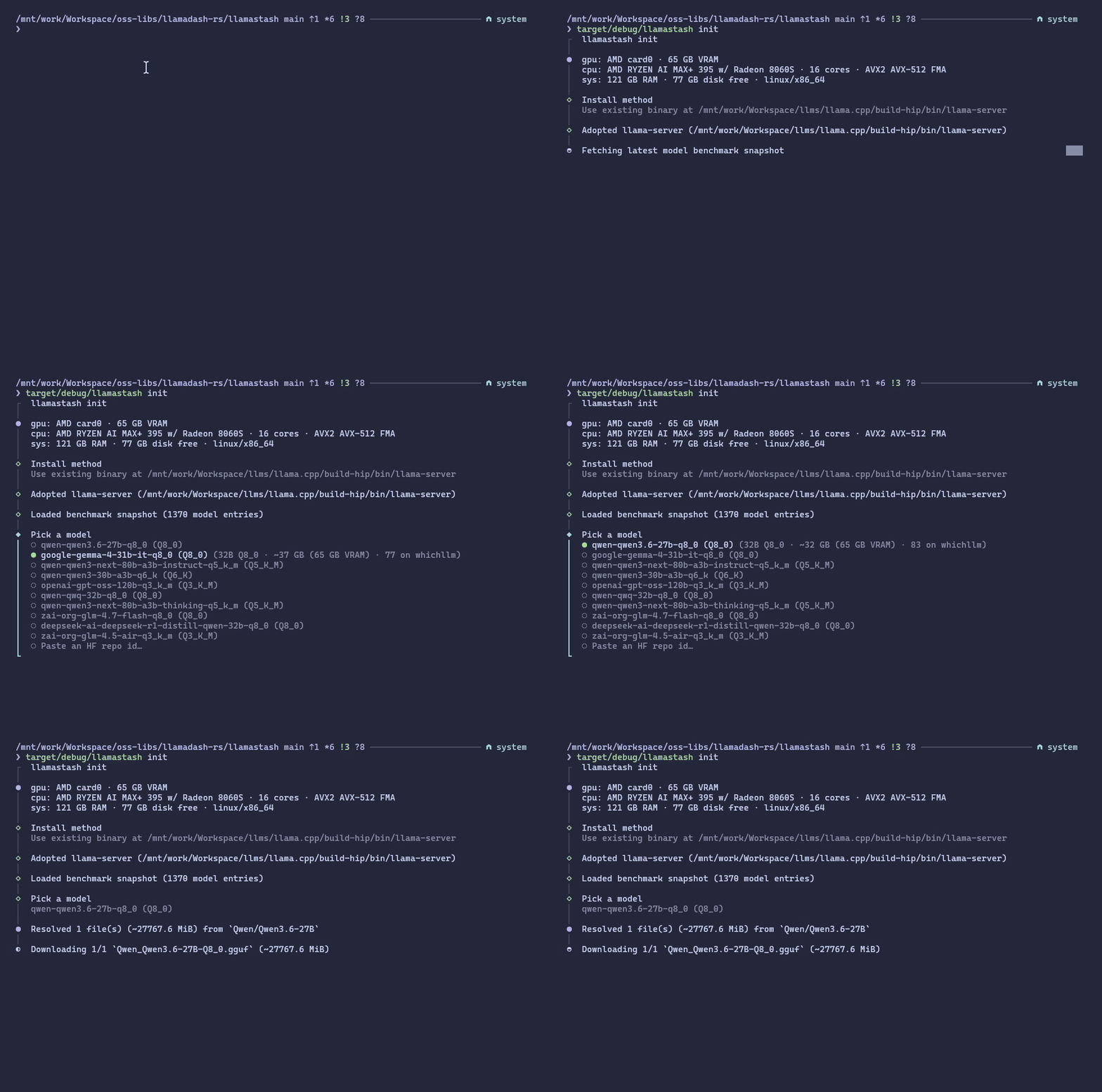
On my Strix Halo machine that means an automatic ROCm/HIP path with sensible defaults. On a MacBook it picks up Metal. On an NVIDIA Linux box it picks up Vulkan (CUDA coming soon). On a Windows 11 machine it picks the matching win-cpu / win-cuda / win-vulkan llama.cpp asset. On an old laptop with no GPU it picks up CPU and quietly recommends a smaller model.
If you already have a llama.cpp build you like, point at it with --llama-server. If you already have GGUFs in ~/.cache/huggingface/, ~/.ollama/models, or ~/.lmstudio/models, LlamaStash discovers them. It also watches your model paths live, so a new download shows up without a restart.
Already have a coding model on disk? Skip the wizard.
llamastash start qwen-coder --ctx 16384 --reasoning onThat’s the whole command. Or use the TUI and pick from a list.
The TUI
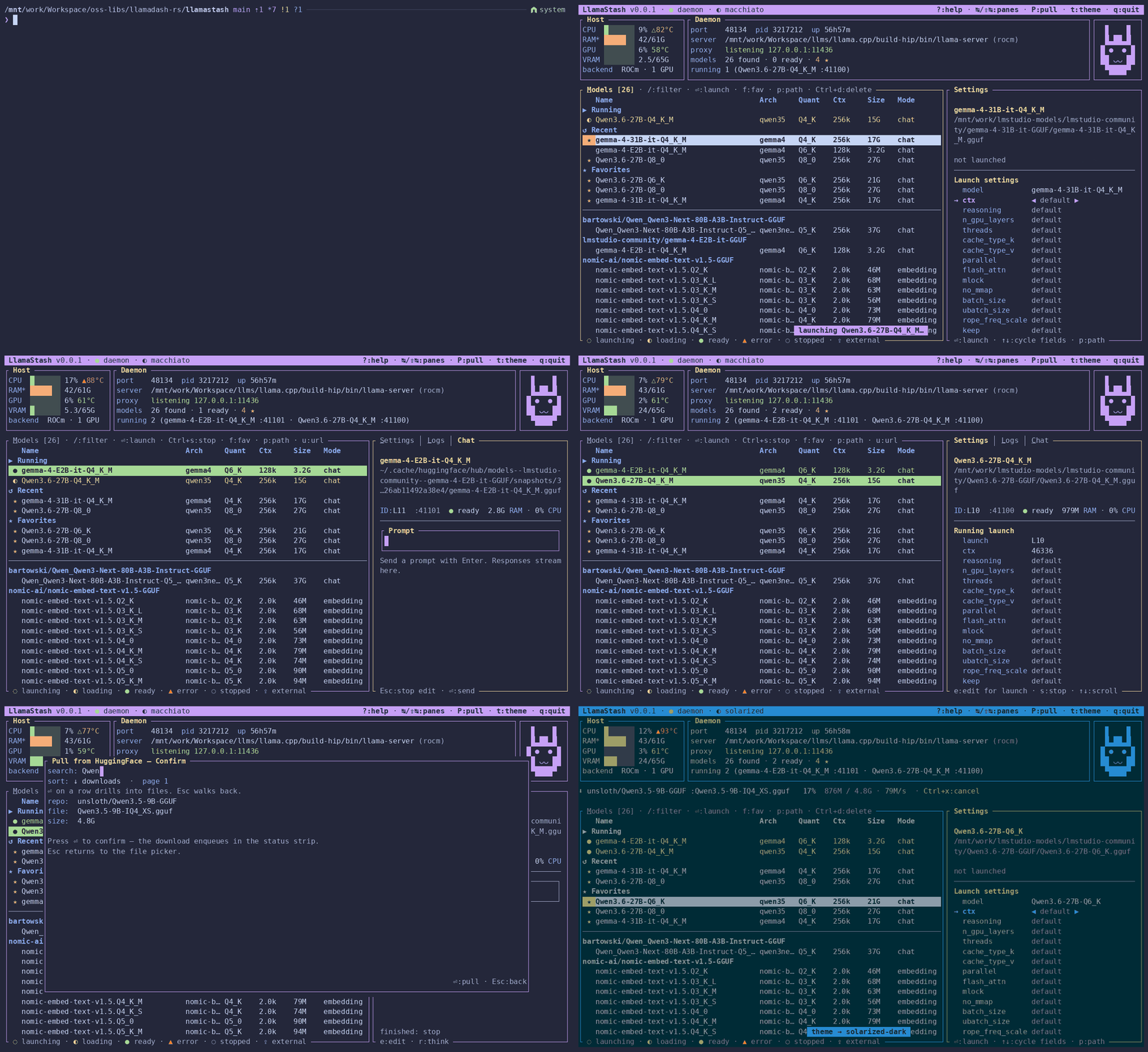
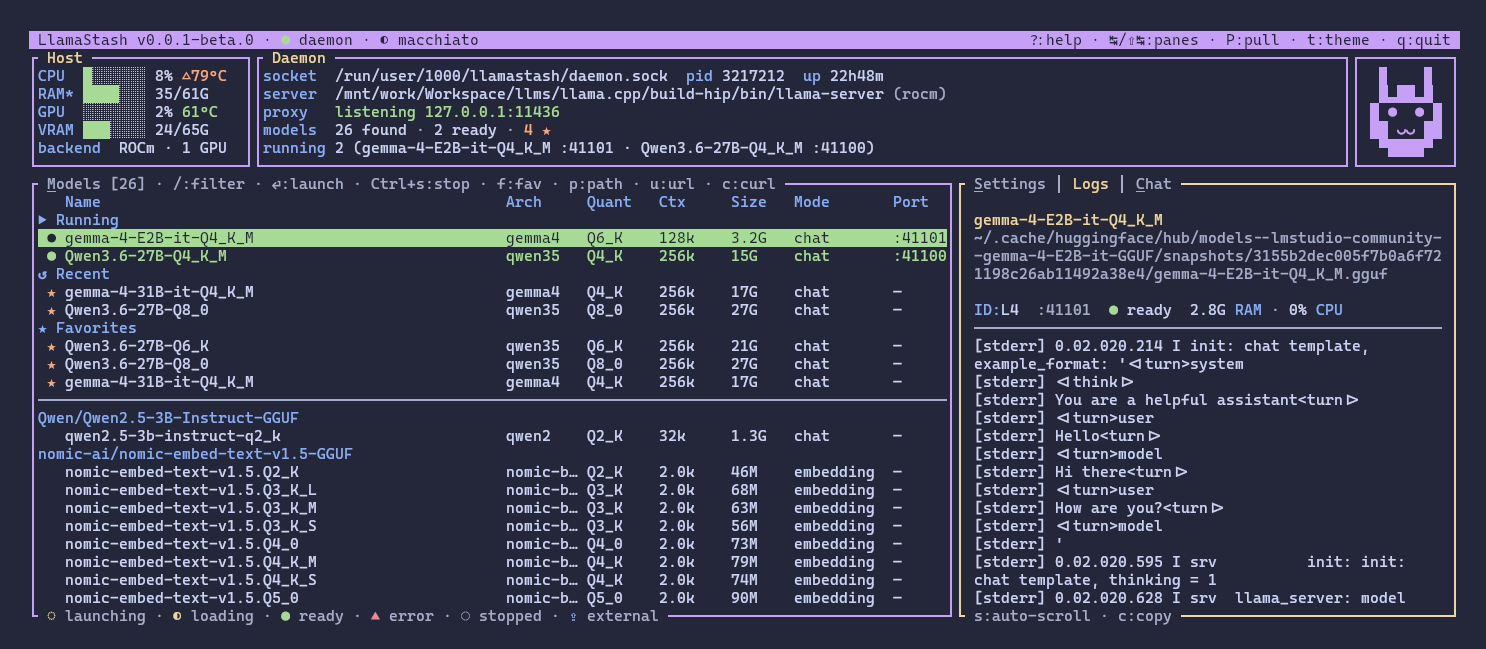
This is what, I hope, most users will spend time in.
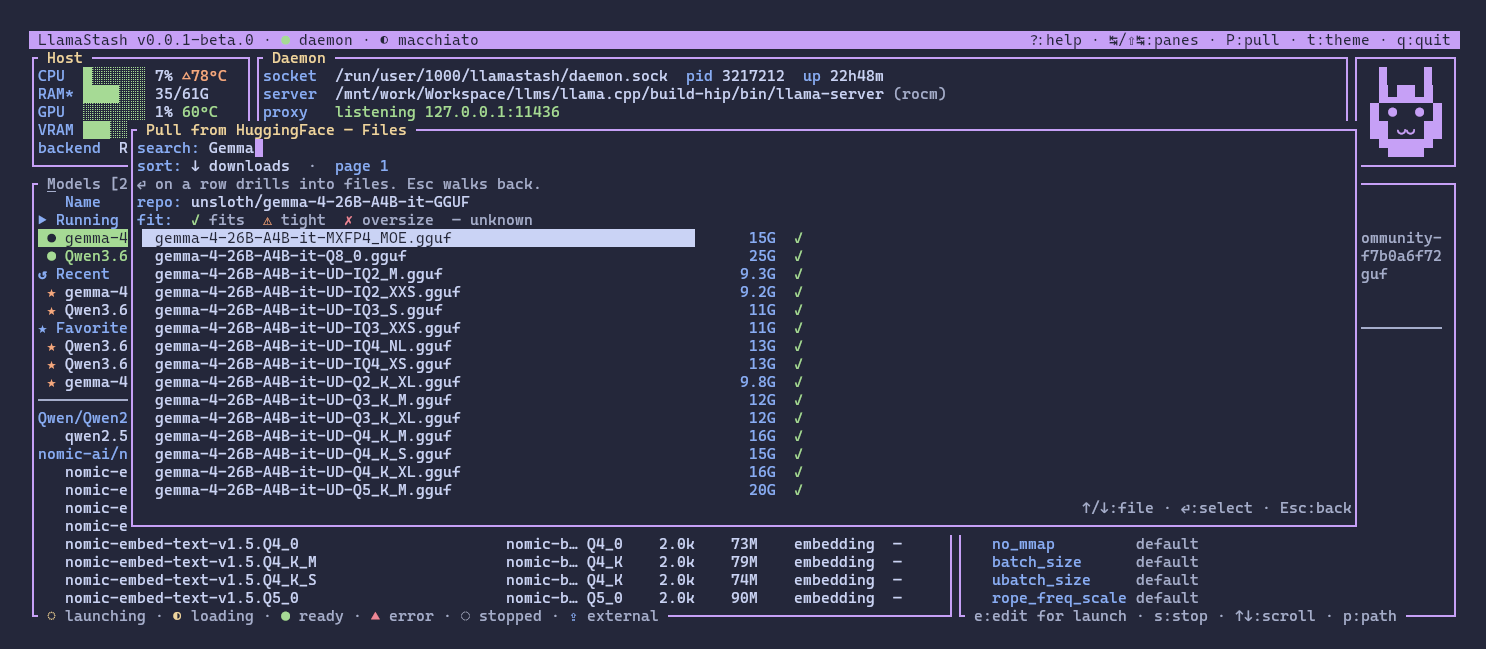
A few things worth knowing:
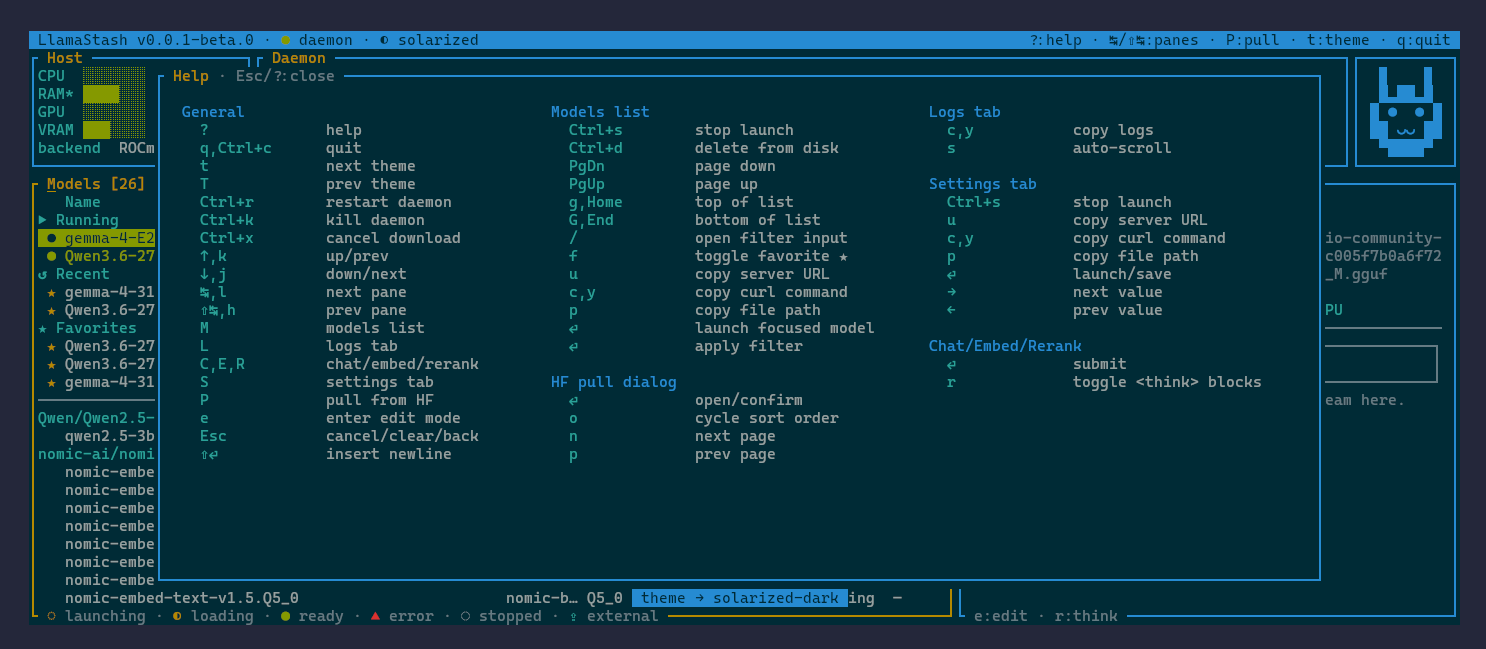
- Vim-style navigation everywhere.
hjkl,Ctrl+F/Ctrl+B,0/$,gt/gTfor tab cycling,/to filter,?for help. The keybindings are not modal voodoo, they are real, documented, and rebindable. - The right pane is a smoke test. Logs, Chat, Embed, Rerank tabs that hit the same OpenAI-compatible endpoint external clients use. So when something works in the TUI, it works in your editor, your agent, your script.
- In-TUI HuggingFace browser. Search, sort, paginate, see per-file hardware fit, download with cancel. No tab-switching to a website.
- Five themes plus custom. Catppuccin Macchiato is the default because of course it is.
- Adaptive layout. Works from 60 cells up. Tiny terminal? List columns and hint chips drop by priority rank so the model name stays readable.
- Accessibility. Status is dual-encoded with both color and a glyph, so it reads on mono terminals too.
The mouse is off by default (except scrolling) so your terminal keeps native click-and-drag text selection. Opt in with --mouse-focus or a single line in config.yaml if you want it.
The CLI
Everything the TUI can do, the CLI can do. The CLI is a first-class surface, not an afterthought.
# List models, human-friendlyllamastash list
# List models, machine-friendlyllamastash list --json | jq
# Show, start, stop, statusllamastash show qwen-coderllamastash start qwen-coderllamastash stop qwen-coderllamastash status --json
# Pull a model from HuggingFacellamastash pull bartowski/Qwen3.6-27B-Instruct-GGUF
# Recommend something based on my hardwarellamastash recommendA few things that matter for scripting:
--jsonis the stable agent contract. If we change the human-readable output, scripts using--jsonkeep working.- Documented exit codes per failure class. Branch on numbers, not on message text.
- TTY output is colored and padded. Piped output is byte-stable TSV, so your
awkandcolumnpipelines keep working.
There is also an Agent Skills bundle in the repo that teaches your coding agent to use the CLI properly. Drop it into your OpenCode, OpenClaw, or Claude Code skills directory and the agent learns to prefer --json, branch on exit codes, and read status --json before configuring an OpenAI-compatible client.
The proxy
Once a model is running, LlamaStash exposes an OpenAI-compatible endpoint on http://127.0.0.1:11435/v1 by default.
curl -s http://127.0.0.1:11435/v1/chat/completions \ -H 'Content-Type: application/json' \ -d '{"model": "qwen-coder", "messages": [{"role": "user", "content": "hi"}]}'OpenCode, Pi, Cline, the OpenAI SDKs, llm-cli, anything that speaks OpenAI works as-is.
A few details worth knowing:
- Auto-start on first request. If the requested model is not running yet, the proxy starts it and serves the request.
- Fallback with audit headers. If launch fails for any reason, the proxy falls back to a Ready peer model and adds
x-llamastash-served-byandx-llamastash-fallback-reasonheaders so the client can react. You can turn off this behavior via thefallback_enabledconfig option if you prefer a hard failure. - Ollama discovery surface.
GET /api/tags,/api/version,/api/ps,POST /api/show. Tools that auto-detect Ollama viaOLLAMA_HOSTwill recognize LlamaStash and fall through to the OpenAI-compat endpoints for actual inference. - Opt-in Ollama drop-in mode. With
--ollama-compat(orLLAMASTASH_OLLAMA_COMPAT=1) the proxy claims port11434and answers the byte-exact “Ollama is running” handshake. The officialollamaCLI talks to it. Most Ollama-Go-based clients talk to it. Useful when you want to replace Ollama in a workflow you didn’t write. - Loopback only, no auth. Single-user local threat model. The proxy refuses LAN binds. LAN exposure plus auth plus TLS is on the roadmap, not in 0.0.2.
Zero overhead means zero overhead
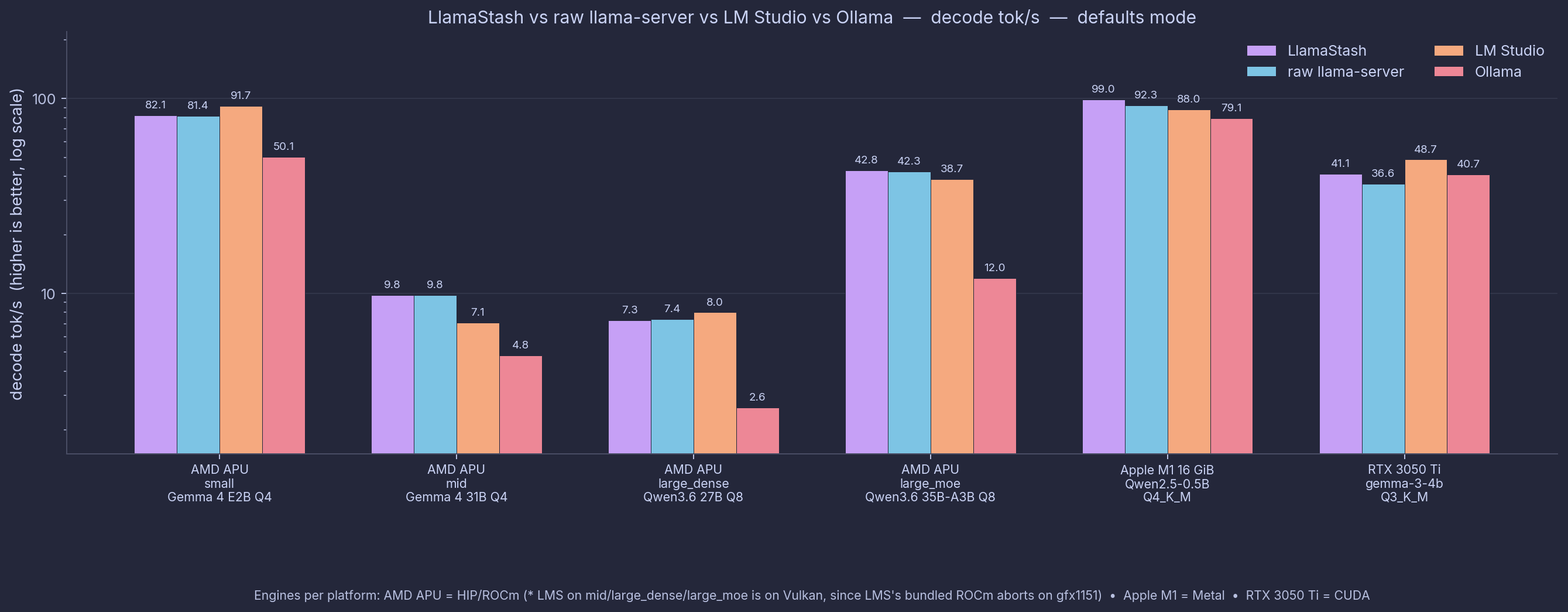
The benchmark detail lives in its own post and docs/benchmarks.md, but here is the one-line version.
LlamaStash spawns the unmodified upstream llama-server. So the wrapper better not add measurable overhead vs running llama-server directly. We measure it. It does not. LlamaStash matches raw llama-server within ≤1% on every cell, across AMD APU, Apple Silicon, and NVIDIA. The proxy hop is +0.45 ms median TTFT and zero impact on decode.
The comparison against Ollama is more interesting, but I’ll let the benchmark post do that talking. The methodology is published. The harness is reproducible. Run make bench-end-to-end and check for yourself.
Architecture, in one paragraph
One Rust binary. Invoking it with no arguments is the TUI. Invoking it with a subcommand is the CLI. Invoking it as llamastash daemon is the supervisor. The TUI and the CLI both talk to the daemon over a 127.0.0.1 HTTP control plane that’s bearer-token-authed. The URL and per-restart token live in a runtime.json handshake file under the state dir, locked down to the file owner (mode 0600 on Unix, Protected DACL on Windows). Same trust model on every supported OS: same-machine, same-UID. The daemon spawns llama-server instances on demand, tracks them with a state machine, picks ports from a configurable range, and exposes the OpenAI-compatible proxy on loopback as a separate listener. State persists to atomic, mode-checked files. If your daemon crashes, the next invocation reads the state and re-adopts the running llama-server instances. Models survive a TUI close. They do not survive a reboot, by design.
For the deeper version, see docs/architecture.md. I had so much fun designing the architecture and a lot of it came from KDash obviously.
How carefully tested?
What CI gates before anything reaches crates.io, the Homebrew tap, or the AUR:
- ~2,000 test attributes across the workspace (1,700+ in Rust, the rest in
pytestandbats). 86.5% line coverage tracked via grcov + Coveralls. cargo audit --deny warningsfor dependency vulnerabilities. Any new advisory fails CI.batsintegration tests forinstall.shon Linux and macOS, plusshellcheck -s shon the script itself.pytestfor the Python packager scripts that drive the Homebrew formula and the AURPKGBUILDs.- MSRV pinned to Rust 1.95, verified with
cargo check --lockedagainst the pinned toolchain. Cross-compile check foraarch64-unknown-linux-gnuon every push. - A “release readiness” job runs
cargo publish --dry-run --lockedplus packager unit tests for both the Homebrew formula and the AURPKGBUILDs, so the publish steps are green before the tag ever moves.
LlamaStash is a single-author project. Bugs will find me. The hygiene above is there to make that less painful when they do. The Windows and macOS builds are not as vigorously tested since I develop on Linux so there are gonna be rough edges there. If you have a Windows 11 machine or a Mac and want to help with testing, please do.
Install
Pick a channel. They all install the same binary. The download is ~5 MB across every supported target.
# macOS + Linux, one-shot installercurl -fsSL https://llamastash.dev/install.sh | sh
# Homebrew (macOS + Linuxbrew)brew install llamastash/llamastash/llamastash
# Arch Linux (AUR)yay -S llamastash # source build from the tagged GitHub releaseyay -S llamastash-bin # prebuilt x86_64 / aarch64 tarballyay -S llamastash-git # main-branch checkout, rebuilds on every -Syu
# Windows 11 (PowerShell, no admin elevation)irm https://llamastash.dev/install.ps1 | iex
# Windows via Scoop bucketscoop bucket add llamastash https://github.com/llamastash/scoop-llamastash && scoop install llamastash
# crates.io (any platform with a Rust toolchain)cargo install llamastashThen llamastash init and you are off.
Full install notes, including the non-interactive agent-friendly path, in INSTALL.md.
What’s not in 0.0.2
A few things are explicitly on the next-release roadmap.
- LAN exposure + auth + TLS. Today: loopback-only by design. If there’s enough interest in safe LAN sharing, that needs auth and TLS done properly. Soon.
- Anthropic
/v1/messagescompatibility shim. OpenAI-compatible is good enough for most agents, but a few prefer the Anthropic shape. - MCP server surface. The CLI is already agent-friendly, so I’m double minded about whether a Model Context Protocol server would make integration smoother. I’m personally not a fan of MCP and prefer skills and CLIs.
- MLX and vLLM backends. llama.cpp is the right default, but I’d like LlamaStash to be backend-pluggable if possible.
- NPU support. It would be nice if the same tool could run models on both GPUs and NPUs, so modern Copilot+ PCs and M-series Macs put their Neural Engines to work too.
- Per-PID VRAM attribution. Today the supervisor reports host-level GPU memory. A per-process number is more useful.
- CUDA on Linux. Vulkan is a fine GPU backend, but CUDA is the most popular GPU compute API on NVIDIA hardware. Today the Linux+NVIDIA route ships the Vulkan binary. CUDA on Linux is a bit sketchy to support (driver version matching, ABI stability), but I want to do it cleanly.
aarch64-pc-windows-msvc. 0.0.2 ships x86_64 Windows only. Snapdragon X / Surface Pro coverage on the roadmap.
Track or shape the roadmap on the TODO.md file in the repo.
Why local AI tooling matters
I wrote about this in the Linux machine post, and I’m not going to repeat it all here. The short version.
I use hosted models too. The best ones are still better at some things. But local-first tooling is a capability I want to have, not just for the privacy or the cost or the offline use, but for the ownership. It lets me change models, contexts, build flags, server parameters, and client config whenever I want. It lets me run experiments that I wouldn’t think to run on a paid API. And in a world that is sliding fast toward a few companies owning the infrastructure that developers depend on, having my own stack feels less like a hobby and more like a small act of preservation.
LlamaStash is one piece of that. There will be others.
Try it, break it, tell me
If you have a Linux box, a Mac, or a Windows 11 machine sitting around with a half-decent GPU (or an Apple Silicon machine with enough unified memory), llamastash init should get you to a working local model in a few minutes. Bug reports, feature ideas, and “this didn’t work for me” stories are all welcome at github.com/llamastash/llamastash/issues.
A star on the repo helps the project show up for other people looking for the same itch. It also makes me feel good about the effort that went into this 🤓. Not going to lie about that.
And finally, thanks to all the AI coding harnesses (OpenCode, Claude Code, Copilot) and LLMs (Claude, DeepSeek, Kimi, Qwen, Gemini, etc.) that turned what would have been a six-month, multi-person project into a one-person, couple-of-weeks project. I’m planning a deeper dive into the development process in a future post, especially the AI harness engineering around it and the vibe coding discipline that made it possible to keep the scope tight and the quality high. Stay tuned.
If you like this article, please leave a like or a comment.
You can follow me on Bluesky, Mastodon, and LinkedIn.